




















































I wanted to test a hidden ranking signal that not many people talk about.
So last year I built a series of sites to see if embedding hidden image exif data into images affects rankings…
…and I’ve been able to answer that question with quite some success
Below I’ll explain the video in more detail.
Lets get started…

What Will I Learn?
Are You Deleting This Data Accidentally?
If you’ve been following traditional image SEO advice like like Google’s page speed insights that tell you to compress your images…

…it’s likely you’ve installed a plugin like WP Smush, Shortpixel or Imagify.
The problem with that, is these plugins often strip this valuable hidden exif data when optimizing images to reduce image size-
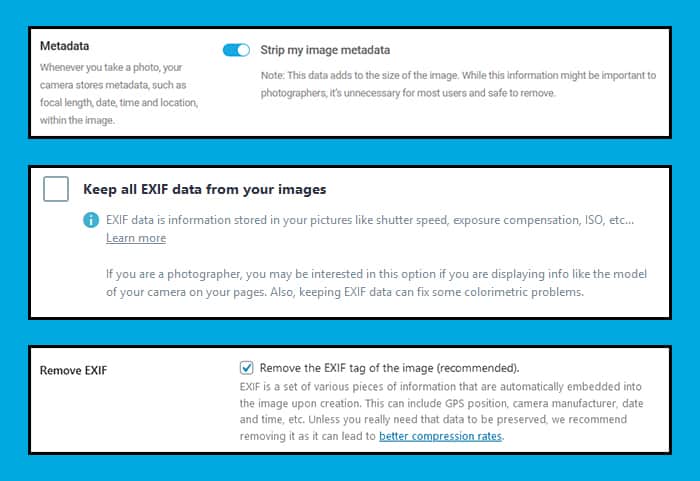
So if you have been following traditional image SEO (alt text etc) & site speed advice.
You might want to take a closer look to make sure you’re not stripping out this hidden image SEO benefit accidentally.

How To Add Exif Data To Your Images
Luckily for us adding exif data to images is both quick and free!
All you have to do is go to thexifer.net and upload an image-

Then click on the little blue “Exif.me” button.
That will open a popup that allows you to edit all of the image exif data to your heart’s content-

I like to play around with the following fields-
- Artist
- OwnerName
- Copyright
- ImageDescription
- UserComment
- By-line
- By-lineTitle
- CopyrightNotice
- Writer-Editor
- Keywords
- ObjectName
- Headline
- Caption-Abstract
- Creator
- Rights
- Title
- Description
- Rating
- Label
- Headline
Once you are done:
You can just click the blue Go.eXifing button here-

It will take a little moment to process the image…
…then you should see a green message like this one at the top of the page-

Now just close the editor…
…and download the final image-

Then upload it to your site and insert it into a piece of content.
BUT!
You should also double-check that the hidden image exif data you just added isn’t getting stripped out automatically.

How To Check For Hidden Image Exif Data
If you are following this process for the first time, I highly recommend you double-check everything.
First, get the current public-facing live URL of your image and save a copy of it.
(or save this sample image)
Then head over to metadata2go.com and upload the image.
This will reveal all of the embedded exif data-
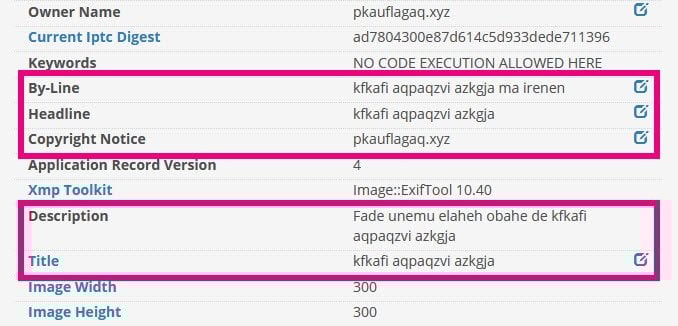
If you do not see the data you added here, then it’s likely the data is being stripped out.
Double-check the settings of plugins like Shortpixel, Imagify or WPSmush and even some CDN’s like CloudFlare Polish will strip this data out.
Fix whatever the problem is then re-upload the image again and repeat the test.

Wrapping It Up
So, does embedding image exif data influence rankings?
Yeah, it seems so!
But if you’ve been following most traditional SEO advice, it’s likely you are stripping out this hidden image SEO advantage unknowingly.

So make sure you are paying close attention!
What do you think about using hidden image exif data as a ranking factor?

You Might Also Like






What Are Your Thoughts?
143 Responses

 Subscribe to my YouTube
 Join My Facebook Group
 Connect on Linkedin
 Free SEO Tutorials
 SEO Case Studies
 Links That Rank





Hi Matthew, is there a quick way to do this for the whole site? Image by image will be a long process. Thanks!
Unfortunately, we have to do it image by image…
I am new to your site…i have doubt is this really working?
Only one way to find out… try it!
great content, congratulations. The question is, is this tactic still effective today 2022?
The best way to find out is to try it!
Hi Matthew, great post! Do I need to do this for all of my images in a single blog post? Or just the main image?Thanks!
Hi Chloe. It would be best if you did it for all your images.
Well informative blog
Thanks 🙂
Thanks for the post. I just have a quick question. Does it mean that we should not use the WP smush or other image optimization plugins on WordPress?.
No, you can still use those plugins
Thanks for bringing this to my attention. I hadn’t heard this before.
Glad you learned something new! Cheers 🙂
Hi Matthew, Great post! I did not know about this, and I feel I am making this mistake. Thanks a lot for bringing my attention to this mistake, I will fix it as soon as possible. I am extremely grateful for you putting this post, it will help a lot of people who are making the same mistake. I will also be sharing this resource in my network to help them out. I appreciate you taking the time and curating this article.
Please, if you try this, let me know if it works for you!
Hi, Matthew WoodwardI’m really impressed with your blog. It was informative. Moreover, how precisely you have described the topic. I will eagerly wait for more and more creatives from you.
Glad it was helpful. Cheers Denny 🙂
Thank you for sharing this wonderful blog. Keep sharing more infromation,
Thank you for reading!
Great blog
Thanks
Good blog
Thanks 🙂
Thank you for sharing this wonderful blogKeep posting
Cheers 🙂
very great, i really enjoy visiting your site
Glad to hear that, thanks!
Great Article. Thank you so much for typing these awesome words for us. I read your blogs which you posted recently, Blogs are too interesting and I will also connect with your blogs in future. Thanks again for this fantastic sharing
Thank you- Glad it was helpful!
such a piece of amazing information. keep it up.
Thanks, Bob- Cheers!
Thank you so much Matthew for sharing such nice articles.
No worries! Always happy to share my tips with my readers!
Mathew you are great man, keep posting such an amazing content.
Don’t worry, I’ll!
Great post shared by you…. It was great experience at your post and thanks for sharing with us.
No problem, Peter!
Thank you for posting such a nice article.
No worries! More cases studies are coming!
This is a great post.
Thank you!
very informative…
Interesting. This may be the reason why ecommerce sites with better images tend to perform way better.
This was my guess as well!